
Personal Learning Devices (PLD)
Find out about the Personal Learning Device (PLD) bundle at Ngee Ann Secondary and how to seek help about the device.
Personal Learning Device (PLD)
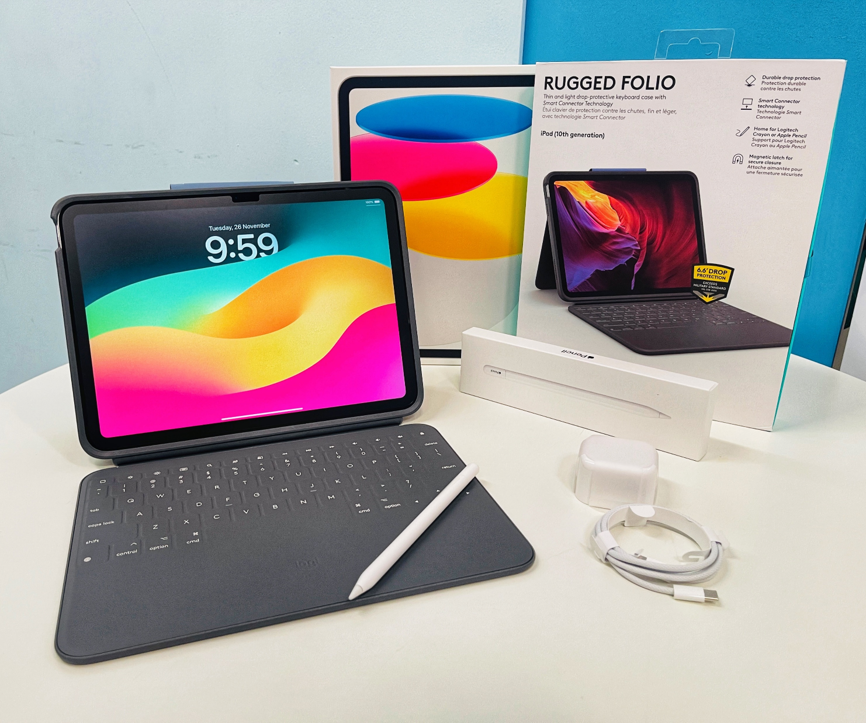
- iPad 11th Generation
- Apple Pencil (USB-C)
- Logitech Rugged Combo 4
Device Warranty & Insurance
Device and accessories warranty and insurance coverage
Device/accessories | Warranty | Insurance |
iPad | 3 years AppleCare+ coverage 4 years AppleCare+ coverage (for iPads purchased from 2026 onwards) | 3 years coverage Sum insured equivalent to unit price of device (2 Repairs with quotation/1 Replacement) 4 years coverage (for iPads purchased from 2026 onwards) |
Keyboard Case | KeppelTech Warranty (unlimited) | Not covered |
Apple Pencil | AppleCare+ shared with iPad 4 years coverage (for iPads purchased from 2026 onwards) | Not covered |
AppleCare+ Policy and Coverage [Link (opens in new tab)]
Insurance Policy and Coverage, before 2026 [Link [PDF, 103.60 KB] (opens in new tab)]
Insurance Policy and Coverage, 2026 onwards [Link [PDF, 1.24 MB] (opens in new tab)]
Service Centre Locations
Keppel Technology Solutions Customer Care Centre
219 Henderson Road
#05-01/02/03/04 Henderson Industrial Park
Singapore 159556
Keppel Tech Hotline: (65) 6272 0088
support@keppeltechsolutions.com
Apple Store
Jewel Changi Airport
78 Airport Boulevard
#02-234
Singapore 819666
Operating Hours: 10am to 10pm
Hotline: 1800 407 4948
Orchard Road
270 Orchard Road
Singapore 238857
Operating Hours: 10am to 10pm
Hotline: 1800 699 2824
Marina Bay Sands
2 Bayfront Avenue, B2-06
Singapore 018972
Operating Hours: 10am to 10pm
Hotline: 1800 407 4949
In-School Helpdesk & Device Management Application (DMA) Support
ICT Helpdesk @ sPACE
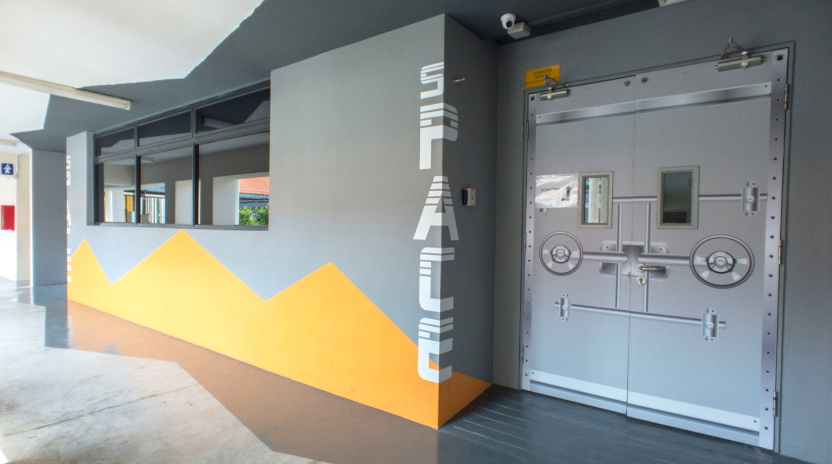
Operating Hours: Monday - Thursday (2.30pm to 4.30pm) | Friday (1pm to 3pm)
Location: Blk B Level 3 (sPACE)
Whatsapp: +65 6229 6762
Email: nass_helpme_ict@moe.edu.sg
Services:
School account password reset
Passcode unlock
Unlock from sleep mode
Troubleshooting
PLD fortnightly collection/dropoff
Password resets for NASS Email & MIMS Account only.
Self-Help Resources:
NASS DMA Guide: go.gov.sg/nass-dma-jamf-guide (opens in new tab)
NASS iPad troubleshooting Guide: go.gov.sg/nass-troubleshoot-guide (opens in new tab)
Keppel DMA Guide for Option A (iPad): https://for.edu.sg/ipadoptiona (opens in new tab)
How to get help
Device issues
Go to ICT Helpdesk @ sPACE first — do not bring the device to the Service Centre directly.
Inform ICT staff of the issue (e.g. storage space, iPad disabled, apps).
ICT staff will troubleshoot and advise.
If everything is working fine, device will be returned.
Device may be wiped to restore functionality (Device data may be lost, data backup is recommended).
Students to seek service via the Service Centres or Keppel Fortnightly Servicing.*
*A temporary iPad will be loaned while the device is being serviced.
iPads with accidental damage are covered under AppleCare+. Devices damaged on purpose are not covered — repair/replacement costs will be charged.
Lost Device
Lost in school
Retrace your steps to the last class/venue visited.
Check with the General Office (GO) in case someone handed it in.
Inform your Form Teacher and await further instructions.
A police report is required if the device is not found within 1–2 days.
Lost outside school
Report the loss to the police.
Inform the General Office.*
Inform your Form Teacher and await further instructions.
*ICT staff will lock the iPad, provided it is powered on and connected to WiFi.
*A temporary iPad may be issued, subject to HOD approval on a case-by-case basis.
After Replacement/change of Devices
Via Apple Authorized Service Centre:
Bring the iPad to sPACE so ICT staff can record the new serial number.*
ICT staff will check MDM enrolment and help re-link school apps (Gmail, Google Classroom, Apple ID).
Keppel Fortnightly Servicing:
ICT staff will contact the student by email/WhatsApp to arrange collection of the iPad from sPACE.
*Repair turnaround time may vary and excludes collection/drop-off time.
FAQ
How long do I need to keep the device's original packaging before discarding it?
Please keep the item for at least 7 days from the date it is received, in case a 1-to-1 exchange is required at the Keppel Service Centre due to a defect.
If i lost my Apple Pencil/Logitech Keyboard, can i get a replacement?
The loss of accessories such as the Apple Pencil or Logitech Keyboard is not included in AppleCare+ or insurance coverage. Replacement items can be purchased from Apple, Keppel, or authorized retailers.
Can I still send devices to Keppel’s service centres for repairs after the warranty period, and how are charges determined?
Yes. The service centre will provide a repair quotation, and students/parents can decide whether to proceed. Alternatively, once the warranty has expired, repairs can be done at other service centres (e.g. shops).
My Apple pencil isn’t working, how do I check if it is faulty?
Apple pencil is covered by the AppleCare+ and not insurance
Students can fix their Apple Pencil on the spot at any authorized Apple Service Centre, or go through the school Helpdesk, which will take about 2–4 weeks.
Loan Apple Pencils or keyboard cases will not be provided while your accessories are undergoing service.
Note: If it is found that the damages is caused by accidental damage, a service fee of $42 is required for Apple pencil. This includes damages found during repair such as internal water damage or cosmetic damages (dent/scratch on body of pencil).
What is considered an Accidental damage?
AppleCare defines accidental damage as damage from handling caused by an unexpected, unintentional external event (e.g. drops, liquid contact). If damage is determined to be accidental, a service fee applies — this includes damage discovered during repair, such as internal water damage.